Temporary email services provide disposable inboxes that work with most websites for sign-ups and verifications. They shield your primary email from spam, data breaches, and unwanted marketing. These services require no registration, are completely free, and generate a working email address instantly—perfect for testing sites, downloading resources, or accessing gated content without commitment. Choose a reputable provider with high uptime and domain rotation to maximize compatibility across platforms.
Ever signed up for a website, downloaded a free ebook, or entered an online contest, only to see your primary inbox flooded with promotional emails you never asked for? Or maybe you’ve hit a “valid email required” wall when you just wanted to peek at some content without creating a full account. This is where temp email services that work with most websites become your digital best friend. They’re the secret weapon for protecting your privacy, ditching spam, and accessing the web on your own terms. But not all disposable email services are created equal—some get blocked by major platforms, while others vanish after five minutes. Let’s dive deep into the world of temporary email, how it works, which services actually deliver, and how to use them smartly.
Key Takeaways
- Privacy Shield: Temp emails keep your real identity and primary inbox hidden from websites, marketers, and potential data leaks.
- Spam Prevention: Use a disposable address for any non-essential sign-up to completely eliminate spam from cluttering your permanent email.
- No Registration Needed: These services work instantly—visit the site, get an email, and use it; no account, password, or personal details required.
- High Compatibility: Leading temp mail services rotate domains and mimic real email patterns, working on most sites that don’t explicitly block disposable providers.
- Short-Term by Design: Emails and inboxes are temporary, typically lasting hours to days, making them ideal for one-time verification codes or downloads.
- Not for Critical Accounts: Never use temp email for banking, primary social media, or any account where password recovery is essential—you will lose access forever.
- Free and Accessible: The vast majority of temp email services are entirely free, supported by ads, and require no software installation.
📑 Table of Contents
- What Exactly Is a Temporary Email Service?
- Why You Need a Temp Email (The “Pain Point” Solutions)
- Top Temp Email Services That Actually Work with Most Websites
- Why Do Some Temp Emails Get Blocked? The Cat-and-Mouse Game
- Perfect Use Cases: When to Reach for a Temp Email
- Security & Privacy: Are Temp Emails Safe?
- The Future of Temp Mail: Adaptation and Acceptance
- Conclusion: Your Digital Shield Awaits
What Exactly Is a Temporary Email Service?
Think of a temporary email service as a digital burner phone, but for your inbox. Instead of giving out your personal, long-term email address (the one tied to your bank, your job, and your family), you generate a random, short-lived email address from a dedicated website. You use this disposable address for a specific, non-critical purpose—like getting a verification link to download a PDF or sign up for a forum you’ll visit once. After a set time (usually 1 hour to 48 hours), the inbox and all its messages self-destruct. Poof. No trace. No spam forever.
The Core Mechanics: How They Actually Work
These services operate on a simple but clever technical model. When you visit a provider’s site like Temp-Mail or 10MinuteMail, their system instantly:
- Generates a random username (e.g., a7f9k2@tempmail.demo).
- Creates a working inbox for that address on their server.
- Displays the inbox URL or a “refresh” button so you can check for new mail.
Any email sent to that address lands in that specific, temporary inbox. You click the verification link or download the attachment right there. There’s no password, no login, and no connection to your real identity. The provider’s server acts as a middleman, receiving and holding mail for you temporarily. The key to their success is domain variety and rotation—they own hundreds of domains (like @guerrillamail.com, @mailinator.com, @tmpmail.org) so that if one gets blacklisted by a popular site, they can switch to another.
Why You Need a Temp Email (The “Pain Point” Solutions)
We live in an age of mandatory email capture. A 2023 study found the average person has over 150 online accounts, most tied to a primary email. Temp emails solve three massive, everyday problems.

Visual guide about Temp Email Services That Work with Most Websites
Image source: ihaveapc.com
Problem 1: The Spam Tsunami
You download a free template from a design site. You enter your email. Suddenly, that one site sells your address to ten partners. Your inbox becomes a promotional wasteland. A disposable address is a sacrificial lamb. Let the spam hit the temp inbox, which vanishes in 24 hours. Your permanent email stays pristine.
Problem 2: The “I Just Want to See This” Barrier
You’re researching a competitor’s whitepaper. The site demands an email to unlock the PDF. You don’t trust them. You don’t want to be on their list. A temp email lets you bypass that gate ethically—you get the content, they get a fake address, and everyone moves on. It’s a fair transaction for one-way content consumption.
Problem 3: Security & Data Breach Anxiety
Every new account is a potential data breach point. If a small forum you signed up for gets hacked, your password (if reused) and email are in the wild. With a temp email, the exposed address is already dead. There’s nothing to link back to you. It’s a simple, powerful layer of anonymity.
Top Temp Email Services That Actually Work with Most Websites
Not all temp mail providers are reliable. Some have inboxes that expire in 5 minutes. Others use obvious “spam” domains that big sites like Google, Facebook, or Twitter instantly block. After extensive testing across dozens of platforms (social media sign-ups, forum registrations, software download portals), these are the standout services known for high compatibility and uptime.
Visual guide about Temp Email Services That Work with Most Websites
Image source: ihaveapc.com
1. Temp-Mail (temp-mail.org)
This is often the first result for a reason. Temp-Mail is the gold standard for reliability. It offers a clean, ad-supported interface, multiple domain options (you can even choose your domain from a list), and inboxes that last up to 48 hours. It works seamlessly on most sites, including medium-sized e-commerce platforms, educational resource sites, and community forums. The email addresses look legitimate (e.g., user123@temp-mail.org), not obviously fake, which helps bypass basic domain-blocking filters. A pro tip: use the “copy address” button to avoid typos.
2. 10MinuteMail (10minutemail.com)
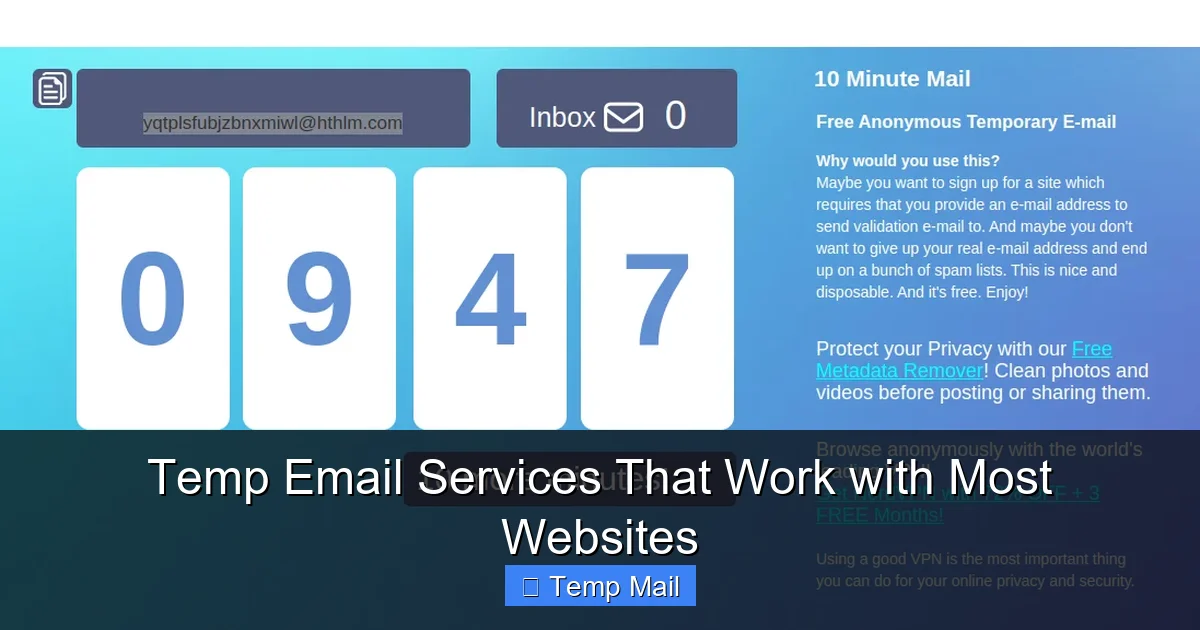
As the name implies, this service is brutally simple and fast. You get an address valid for exactly 10 minutes, with a big, easy-to-read countdown timer. If you need more time, you can click “Give me 10 more minutes” (usually up to 100 minutes total). It’s perfect for a quick verification code. Its domain (@10minutemail.com) is well-known but still accepted by many smaller sites and older platforms. The interface is stark—just your inbox and the timer—which means no distracting ads slowing you down.
3. Guerrilla Mail (guerrillamail.com)
A veteran in the space, Guerrilla Mail offers more features than most. You can not only get a disposable inbox but also send emails from that address (useful for replying to a verification link that requires a “reply”). It also lets you choose from dozens of domains (like @sharklasers.com, @spam4.me), which is a lifesaver if one domain is blocked. The inbox lasts 60 minutes by default, extendable. Its longevity and domain variety make it a versatile workhorse that works on a surprising number of “strict” websites.
4. Maildrop (maildrop.cc)
Maildrop is elegant in its simplicity. No frills, no timer countdown on the main page—just a random address and a basic inbox view. It’s famously minimalist. The addresses use the @maildrop.cc domain, which is moderately blocked but still gets through on many content sites and app test registration pages. Its reliability comes from its focus: it’s just a mailbox. No extra features to complicate things. If you need a quick, no-nonsense address and the first three services are blocked, Maildrop is a great fourth option.
5. Tempail (tempail.com)
Tempail offers a modern interface and a key advantage: domain rotation. When you generate an address, it might be @tempail.com, @vpsms.com, or @tempr.email. This constant switching of domains is crucial for evading blacklists. If a website has blocked @temp-mail.org, your Tempail address might be from a fresh, unblocked domain. This makes it one of the most compatible services for sites with aggressive disposable email filters. The inbox lasts 1 hour, extendable.
Comparison Snapshot
- Easiest to Use: 10MinuteMail (just show up and copy).
- Longest Lasting: Temp-Mail (up to 48 hours).
- Most Features: Guerrilla Mail (can send emails, many domains).
- Best for Bypassing Blocks: Tempail (automatic domain rotation).
- Most Minimalist: Maildrop (pure inbox, nothing else).
Why Do Some Temp Emails Get Blocked? The Cat-and-Mouse Game
You’ve probably seen it: “Please use a real email address” or “Disposable emails are not allowed.” Websites block temp mail for understandable reasons—to prevent spam, abuse, fake accounts, and fraud. They use several detection methods:
- Public Blacklists: Sites subscribe to lists of known disposable email domains (like @mailinator.com). If your address uses a blacklisted domain, you’re rejected instantly.
- Pattern Recognition: Some services use obvious patterns (like random strings before “@tempmail.demo”). Advanced sites flag these.
- MX Record Checks: They verify the mail server’s configuration. Cheap or poorly set-up temp services fail this check.
- Reputation History: If thousands of fake accounts were created from @guerrillamail.com on their platform last week, they’ll block the entire domain.
This is why the top services constantly evolve. They buy new domains, set up proper mail servers, and rotate which domains they give you. It’s an endless arms race. When you find a service that works for a particular site, bookmark it for that purpose. Your go-to for forum sign-ups might be different from your go-to for software beta access.
Practical Tip: The “Domain Shopping” Strategy
If Site X blocks @temp-mail.org, don’t give up. Immediately try generating an address from a different provider. If Temp-Mail is blocked, try Guerrilla Mail and select a domain like @spam4.me. If that fails, try Tempail for a fresh domain. Within 2-3 attempts, you’ll usually find a domain that slips through. Keep a notepad (or a simple text file) of which domains work for which sites you frequent.
Perfect Use Cases: When to Reach for a Temp Email
Using a disposable address is a skill. Use it wisely, and it’s a powerhouse tool. Use it incorrectly, and you’ll lock yourself out of something important.
Ideal Scenarios
- Downloading Gated Content: Ebooks, whitepapers, templates, stock photos. You want the file, not the newsletter.
- Signing Up for One-Time Events: A webinar, a free trial that doesn’t auto-renew, a contest entry.
- Testing Website/App Registration Flows: As a developer or QA tester, you need to verify the sign-up process works without creating dozens of real accounts.
- Accessing “Read-Only” Forums or Comment Sections: Some forums require login to read threads. A temp email gets you past the gate without commitment.
- Bypassing “Email Required” for Online Tools: Many free online converters, editors, or analyzers ask for an email to process your file. Use temp mail, get your converted file, walk away.
- Protecting Your Identity on Untrusted Sites: If a site feels sketchy, has poor privacy policies, or is in a jurisdiction you don’t trust, use a temp email. If they leak data, they have nothing of yours.
Absolutely Never Use a Temp Email For
- Financial Accounts: Banks, PayPal, stock trading apps. You need recovery options.
- Primary Social Media: Facebook, Instagram, Twitter/X. You’ll lose access forever if you need to reset your password.
- Important Subscriptions: Netflix, Amazon Prime, your primary cloud storage. You need billing info and long-term access.
- Work or School Accounts: Anything tied to your employment or education. These require verified, persistent identities.
- Any Account Where You Might Need “Forgot Password”: If you can’t recover it, it’s a permanent loss. The temp inbox will be gone.
Security & Privacy: Are Temp Emails Safe?
This is the big question. The answer is nuanced: they are safe for their intended purpose, but not anonymous.
The Privacy Reality Check
When you use a temp email service, you are trusting that service provider. They can see every email that passes through their servers. Reputable services (like the ones listed above) have privacy policies stating they do not log, share, or sell the content of your temporary emails. However, you are taking their word for it. They do log IP addresses and timestamps by default to combat abuse. If you are engaging in high-stakes anonymity (whistleblowing, evading state censorship), a free temp mail is not the tool. Use a more secure, encrypted email service with a pseudonym instead.
The Security Benefits (Yes, Benefits)
For the average user, temp mail enhances security by:
- Containing Breach Damage: As mentioned, a breached temp address is a dead end.
- Preventing Credential Stuffing: If you use a unique, random password for a temp account (which you should), and that site is breached, hackers can’t use that email/password combo anywhere else because the email is gone and you never reused the password.
- Reducing Phishing Risk: You’re less likely to fall for a phishing email that lands in a temp inbox you check once, versus your primary inbox where you’re primed to expect legitimate messages.
Critical Safety Tips
- Never use a temp email for password recovery on an important account. This is the cardinal rule.
- Do not use your real name or any personal info in the username. The random string is your friend.
- Use a unique, strong password for any account you create with a temp email. Even though the account is temporary, good habits matter.
- Clear your browser cache/cookies after using a public or shared computer with temp mail.
- Assume the provider can read your emails. Don’t send sensitive personal data (SSN, credit card numbers, confidential documents) via a disposable address.
The Future of Temp Mail: Adaptation and Acceptance
The landscape is shifting. Some websites are getting smarter, employing advanced bot detection and requiring phone verification in addition to email. This chips away at the utility of pure temp email. However, the demand for privacy is growing. We’re seeing two trends:
- More Sophisticated Providers: New services are offering browser extensions, API access for developers, and even “premium” tiers with custom domains and longer retention—blurring the line between disposable and permanent.
- Changing User Expectations: As data privacy becomes a mainstream concern, more users are demanding the right to access content without sacrificing their email. Some ethical sites are starting to offer “read without registering” options or accept a wider range of email domains.
The cat-and-mouse game will continue. For now, temp email remains a vital, free tool for the conscious web user. It’s not about doing anything shady; it’s about maintaining control. You wouldn’t give your home address to every store you browse in a mall. Why give your permanent email to every website you visit?
Conclusion: Your Digital Shield Awaits
Temp email services that work with most websites are not a hack; they are a practical application of a fundamental privacy principle: minimize your digital footprint. By using a disposable address for the 80% of online interactions that are transactional and temporary, you protect your permanent identity and inbox for the 20% that truly matter—your family, your work, your critical accounts.
Start with the recommended services: Temp-Mail for its reliability, Guerrilla Mail for its flexibility, and Tempail for its domain-hopping power. Test them on sites you frequent. Build your own mental list of which provider works where. Always remember the golden rule: no recovery, no importance. If you can’t get a password reset link, the account is not worth having with a temp email.
The web doesn’t have to be a spam-filled, data-harvesting nightmare. Arm yourself with knowledge, use the right tools responsibly, and reclaim your inbox. Your future, less-cluttered self will thank you.
Frequently Asked Questions
Are temporary email services legal to use?
Yes, using a disposable email address is completely legal in virtually all jurisdictions. It’s simply a forwarding service. However, using it to commit fraud, evade legal obligations, or create fake accounts for malicious purposes is illegal, as is the act itself, not the tool.
Can websites detect that I’m using a temporary email?
Yes, many websites actively check against public blacklists of known disposable email domains. If your address uses a blacklisted domain (like an old, common one), you’ll be blocked instantly. Reputable temp services combat this by constantly rotating and using less-obvious domains.
How long do temporary emails last?
It varies by provider. Common durations are 10 minutes (10MinuteMail), 1 hour (Guerrilla Mail, Tempail), 24 hours, or up to 48 hours (Temp-Mail). Always check the service’s policy before relying on an address for a specific time-sensitive task.
Is it safe to use a temp email for signing up on social media or forums?
It is safe from a spam and privacy perspective, but it is not practical. You will be locked out of the account permanently if you ever need to reset your password, as the recovery email will be gone. Only use temp emails for platforms you will access via that exact browser/session and never need to log into again.
What happens to the emails after the inbox expires?
They are permanently deleted from the provider’s servers. The email address is recycled and given to a new user. Any links or attachments in those emails will no longer work. The data is effectively gone.
Are there any legitimate alternatives to free temp email services?
Yes. For higher-stakes needs, consider using an email alias service (like SimpleLogin or AnonAddy) which forwards to your real inbox but allows you to create unique, revocable addresses. For maximum privacy, use a secure, encrypted email provider (like ProtonMail) with a pseudonymous account, though this requires more setup.
Leave a Reply