Disposable email addresses are your first line of digital defense in 2026. They shield your primary inbox from spam, data breaches, and unwanted tracking when signing up for websites, downloading files, or accessing one-time content. Not all temp mail services are created equal—some offer minutes-long lifespans, while others provide customizable domains and enhanced security. Choosing the right provider depends on your specific need for speed, privacy, or advanced features like email forwarding and attachment support.
Key Takeaways
- Disposable emails are for temporary, low-trust interactions: Use them for forum sign-ups, freebie downloads, or any service where you wouldn’t share your real email. They are not for banking, primary accounts, or critical communications.
- Lifespan and inbox access vary by provider: Some auto-delete after 10 minutes, others last 24-48 hours. Always check if you can manually extend the inbox life if needed.
- Privacy and no-logs policies are non-negotiable: The best providers do not require personal info, use encryption, and have clear policies stating they do not store or scan your emails.
- Feature sets differ significantly: Look for attachment support, custom domain options, browser extensions, and the ability to reply from the disposable address if you need to engage briefly.
- “Burner” vs. “Custom” disposable services: Burner services (like 10MinuteMail) are ultra-simple and anonymous. Custom services (like SimpleLogin) let you create unique, forwardable aliases tied to your main account.
- They complement, not replace, good cybersecurity: Use a password manager and 2FA on your primary accounts. Disposable emails manage *inbox* risk, not account security.
- Expect increased regulation and provider consolidation by 2026: As privacy laws tighten, some smaller providers may shut down. Stick with established, transparent services with a proven track record.
📑 Table of Contents
- The Evolving Landscape of Disposable Email in 2026
- How We Evaluate the Best Disposable Email Providers in 2026
- The Top 5 Disposable Email Providers for 2026
- Critical Considerations and the Future of Temp Mail
- Practical Guide: When and How to Use Disposable Email
- Conclusion: Privacy as a Habit, Not a Tool
The Evolving Landscape of Disposable Email in 2026
Remember the early days of temp mail? A bare-bones website, an auto-generated address, and an inbox that vanished faster than your motivation on a Monday morning. That world is gone. In 2026, disposable email providers have matured into sophisticated privacy tools, responding to a decade of data breaches, spam AI, and hyper-aware users. The “best” service isn’t just about the shortest lifespan anymore; it’s about a delicate balance of anonymity, functionality, and reliability in an ecosystem that’s constantly adapting.
This shift is driven by two forces. First, users are smarter. We know that every “free” service often trades our data for profit. Second, regulators like the EU (with evolving ePrivacy Directive interpretations) and states in the U.S. are scrutinizing data collection more closely, forcing email providers to be transparent. The result? A new tier of disposable email services that are less “throwaway” and more “strategic shield.” They are a tactical tool in your broader digital hygiene kit, designed to compartmentalize your online identity. Let’s break down the leaders in this space and what makes them stand out for the year ahead.
How We Evaluate the Best Disposable Email Providers in 2026
Beyond the 10-Minute Countdown
Our evaluation framework has evolved. While speed is still a factor, we prioritize a holistic view of value and trust. Here’s the rubric we used to select the top providers for 2026:
Visual guide about Best Disposable Email Providers in 2026
Image source: maketecheasier.com
- Privacy & Anonymity (Weight: 30%): Does it require registration? What data is logged? Is traffic encrypted (HTTPS/TLS)? Can you use Tor or a VPN without issues? A true disposable email service should leave no traceable footprint linking the address back to you.
- In Lifespan & Control (Weight: 25%): How long does the inbox last? Is it fixed or extendable? Can you manually delete emails? The best services offer flexibility—a 1-hour window for a quick download, or a 48-hour window for a multi-day trial sign-up.
- Feature Set & Usability (Weight: 25%): Does it support attachments? Can you reply from the disposable address? Is there a browser extension or mobile app for one-click generation? A clean, ad-free interface is a significant plus in 2026.
- Reliability & Uptime (Weight: 10%): Nothing is more frustrating than an inbox that never loads or emails that bounce. We tested for consistent delivery and server stability.
- Transparency & Business Model (Weight: 10%): Is the company’s funding clear? Do they sell data? Do they have a clear, ethical revenue model (e.g., freemium, donations, paid plans)? This is the make-or-break factor for long-term trust.
The Top 5 Disposable Email Providers for 2026
Based on our rigorous evaluation, these five services represent the best in class for different user scenarios. The landscape is dynamic, so we’ve highlighted their core strengths and ideal use cases.
Visual guide about Best Disposable Email Providers in 2026
Image source: zerobounce.net
1. SimpleLogin (Now Part of Proton)
SimpleLogin was acquired by Proton AG (the makers of Proton Mail) in late 2024, and the integration has only strengthened its position as the premier custom disposable email service for 2026. It’s no longer just a “temp mail” site; it’s a full-featured email alias management system.
Why it’s best: It bridges the gap between anonymity and utility. You create a unique, random alias (e.g., newsletter-xyz@simplelogin.co) that forwards to your real inbox. You can reply from that alias, keeping your real address hidden. The alias is permanent until you delete it, offering more control than a 10-minute burner. With Proton’s infrastructure, it boasts Swiss-based privacy laws and end-to-end encryption for replies.
Best for: Users who want a long-term, organized system of masks. Perfect for signing up for newsletters, online shopping, or any service you might use repeatedly but don’t want marketing from. The free plan offers 10 aliases, with paid tiers for more.
2026 Consideration: Expect deeper integration with Proton ecosystem features like Proton VPN and Proton Calendar, making it part of a comprehensive privacy suite.
2. Temp-Mail.org (The Enduring Powerhouse)
Temp-Mail.org has consistently topped lists for years by perfecting the core disposable email formula: instant, anonymous, no-frills. In 2026, it remains the gold standard for pure, no-strings-attached temporary inboxes.
Why it’s best: It epitomizes simplicity and speed. You land on the site, you have an inbox ready in seconds. No CAPTCHA, no registration, no ads in the inbox itself (they support themselves via discreet sidebar ads). Inbox lifetime is a generous 2 days by default, with the option to extend. It supports attachments and has a clean, dark-mode-friendly UI. Its reliability is legendary; emails from most major providers (Gmail, Outlook, etc.) deliver without issue.
Best for: The classic use case: downloading a file from a sketchy forum, testing an app’s email verification, or accessing a one-time gate. When you need an email address *right now* and will never think about it again, this is your tool.
2026 Consideration: Watch for potential domain changes as spam filters become more aggressive against known temp mail domains. They have a history of adding new domains to stay ahead.
3. AnonAddy (The Open-Source Champion)
AnonAddy is the community favorite and a beacon of transparency. Like SimpleLogin, it’s an alias forwarder, but it’s fully open-source and self-hostable, giving control freaks and privacy purists everything they need.
Why it’s best: Its open-source nature means its code can be audited by anyone. You can trust it because you can see it. The self-hosting option is a killer feature for 2026—tech-savvy users and small businesses can run their own disposable email server on a VPS, ensuring zero third-party data access. The hosted service is also excellent, with a generous free tier (5 aliases) and a clear, ethical business model.
Best for: Developers, security researchers, and anyone who believes “trust but verify.” Also ideal for organizations that need to create many unique forwarding addresses without exposing employee emails.
2026 Consideration: As privacy regulations tighten, open-source projects like AnonAddy may gain immense credibility. Expect more integrations with other open-source privacy tools.
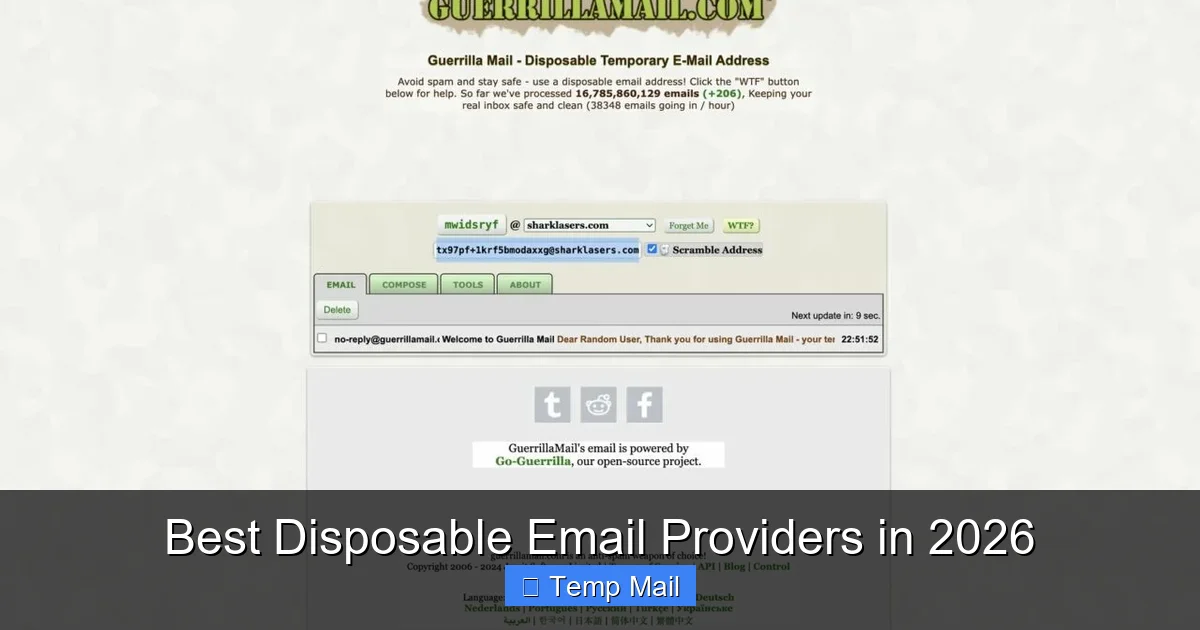
4. Guerrilla Mail (The Feature-Packed Veteran)
Guerrilla Mail has been around since the dawn of temp mail and has continuously innovated. In 2026, it’s the most feature-rich traditional burner service available.
Why it’s best: It does everything a burner should, plus more. You can choose from dozens of domain names (a key tactic to avoid spam filters). You can manually set the inbox expiration from 1 hour to 1 day. It has a built-in password generator, a Bitcoin address for donations (a nod to its cypherpunk roots), and even a simple note-taking feature. The ability to reply *from* the disposable address within the same session is a rare and valuable feature for burner services.
Best for: Users who need a little more control and a few extra tools within their temporary inbox. Great for situations where you might need to have a brief email exchange (e.g., a seller on a marketplace) without revealing your real address.
2026 Consideration: Its longevity is its strength, but also a target. Spam filters are wise to its long-standing domains. Its constant addition of new domains is its primary defense.
5. Firefox Relay (The Browser-Integrated Solution)
From the makers of the Firefox browser, Relay represents the future of seamless, built-in privacy. It’s not a standalone website you visit; it’s a service that creates masks directly within your browser or email client.
Why it’s best: Integration and convenience. The Firefox browser extension (and now a standalone mobile app) allows you to right-click on any email field and generate a disposable email alias on the fly. These aliases are subdomains of @relay.firefox.com and forward to your registered Firefox account email. The free plan offers 5 masks with forwarding, and a premium plan adds unlimited masks, the ability to reply, and custom subdomains.
Best for: Firefox loyalists and anyone who values “set it and forget it” convenience. It’s perfect for everyday sign-ups where you don’t want to even think about opening a separate tab for a temp mail service.
2026 Consideration: As Mozilla expands its privacy product suite, Relay will likely become a cornerstone. Expect tighter integration with Firefox Monitor (breach alerts) and potentially a VPN bundle.
Critical Considerations and the Future of Temp Mail
The Arms Race with Spam Filters
In 2026, the biggest challenge for disposable email providers isn’t building features—it’s staying deliverable. Major email providers (Google, Microsoft, Yahoo) have become incredibly sophisticated at identifying and blocking emails sent to known disposable domains. This means the moment a temp mail domain gets popular, it starts getting flagged, and emails may land in spam or bounce outright.
This is why the top providers constantly rotate and add new domains. When you use a service like Temp-Mail.org or Guerrilla Mail, you’re often given a choice of several domains. Choosing a less common one can sometimes improve deliverability. The future will see providers using AI to dynamically generate subdomains that look more like legitimate addresses, staying one step ahead of filtering algorithms.
Legal and Regulatory Pressures
“Anonymity” is under scrutiny. While legitimate users value it, bad actors abuse disposable email for fraud, harassment, and illegal activities. This puts pressure on providers to implement some form of accountability. Don’t be surprised in 2026 to see more services implementing subtle, privacy-preserving logs—like hashed IP addresses stored for 24 hours for abuse investigation, but not linked to your inbox content. Services based in privacy-friendly jurisdictions (Switzerland, Germany) will have an advantage, as they are less susceptible to law enforcement requests from countries like the U.S.
For users, this means reading the privacy policy. A provider that states “we do not log IP addresses or store emails after deletion” is still the gold standard. Be wary of any service that asks for a phone number or other verification for a “free” disposable inbox—that’s a red flag.
Feature Convergence: The Burner/Custom Blur
The line between a “burner” (10MinuteMail style) and a “custom alias” (SimpleLogin style) is blurring. In 2026, the best providers offer both models. You might use a 15-minute burner for a quick download, then create a permanent alias from the same service for your weekly grocery delivery. This convergence is user-centric—it recognizes that our digital lives need both a blowtorch (for instant, high-heat, short tasks) and a precision scalpel (for controlled, long-term segmentation). Look for providers that offer this spectrum within one account.
Practical Guide: When and How to Use Disposable Email
The “Yes” List: Perfect Use Cases
Using a disposable email provider is a smart habit. Here’s when to fire one up:
- Downloading “gated” content: E-books, whitepapers, or templates that require an email. You get the file; they get a dead-end address.
- Signing up for forums or comment sections: Especially on news or hobby sites where you want to participate once without a lifetime of marketing emails.
- Trying a new app or service: Before committing your real email, test the waters. If the app is shady or spammy, you can just delete the alias or let the burner expire.
- Accessing public Wi-Fi: Some captive portals ask for an email to log in. A disposable address is perfect here.
- Creating test accounts for development: Developers need bulk email accounts for testing. Disposable services are a godsend.
The “No” List: When to Never Use Them
Equally important is knowing when disposable email is the wrong tool. Using it here can cause serious problems:
- Any financial or primary account: Banks, PayPal, Amazon, your main Google/Microsoft/Apple ID. You will be locked out permanently if you lose access to the disposable inbox.
- Official government or medical services: These often require verified, stable contact information. Using a temp mail could invalidate your application or access.
- Work or school-related accounts: Your employer or university will need to communicate with you officially. Do not use a disposable address for this.
- Long-term subscriptions you care about: A Netflix subscription? A cloud storage plan? Use your real email. You need those renewal and security notifications.
A Step-by-Step Workflow for 2026
Here’s how to integrate disposable email seamlessly into your routine:
- Choose Your Primary Tool: Based on this guide, pick one primary service. For most, we recommend starting with a forwarder like SimpleLogin or AnonAddy for its flexibility.
- Bookmark or Install: Add the website to your bookmarks bar, or install the browser extension (Firefox Relay, SimpleLogin).
- Generate on the Fly: When you hit an email field, use your tool to create a new alias/address. Copy and paste.
- Organize (if using aliases): In your forwarder’s dashboard, label aliases by purpose (e.g., “Newsletter – TechCrunch,” “Shopping – Unknown Store”). This lets you see what’s sending emails and easily block/delete an alias if it starts spamming.
- Dispose Responsibly: If using a burner, just close the tab. The inbox and all emails will vanish. If using an alias, log into your forwarder dashboard periodically and delete any aliases associated with services you no longer use or that have started spamming.
Conclusion: Privacy as a Habit, Not a Tool
The best disposable email providers in 2026 are more than just websites that give you a random address. They are gateways to a philosophy of data minimization—the principle of only giving out the absolute minimum personal information required for a task. In a digital world obsessed with collection, this is a radical act of self-defense.
Whether you choose the seamless integration of Firefox Relay, the custom control of SimpleLogin, or the raw anonymity of Temp-Mail.org, you are taking a proactive step. You are drawing a line in the sand, saying, “This part of my identity is not for sale.” The tools are better, faster, and more reliable than ever. The only missing ingredient is your consistent use. Make generating a disposable email your automatic response to any non-essential online form. In 2026, your primary inbox’s sanity—and your digital privacy—will thank you for it.
Frequently Asked Questions
Are disposable email addresses legal to use?
Yes, using a disposable email address is perfectly legal. It is a legitimate privacy tool. However, using it to commit fraud, evade legal responsibilities, or send malicious content is illegal. The service itself is legal; the user’s intent determines legality.
Can I send emails from a disposable address?
It depends on the provider. Traditional “burner” services (like Temp-Mail) typically do not allow sending emails—they are for receiving only. Forwarder/alias services (like SimpleLogin or AnonAddy) do allow you to reply from your disposable alias, with the reply routing through their servers to hide your real address.
Will using a disposable email protect me from all spam?
It is highly effective but not 100% foolproof. It protects your primary inbox from spam caused by the specific service you signed up with. However, if a company you used a disposable email for sells your data to a third party, that third party might still try to send spam to the disposable address (which will expire). It also does not prevent tracking via other methods like browser cookies or device fingerprinting.
What happens to emails sent to an expired disposable inbox?
They are permanently and irrecoverably deleted by the provider’s servers. Once the inbox’s time limit (e.g., 24 hours, 2 days) is up, all emails are wiped. You cannot retrieve them. This is by design to ensure privacy and prevent storage costs for the provider.
Are disposable email providers safe from hackers?
Reputable providers use HTTPS encryption for web traffic and have strong security practices. However, “safe” is relative. Because these services are designed for anonymity, they often lack robust account recovery options. If a hacker gained access to your temporary inbox session (e.g., via malware on your computer), they could see the emails. The greater risk is using a provider with poor security that suffers a breach, potentially exposing the contents of active disposable inboxes. Choose transparent, established providers.
How do websites know I’m using a disposable email?
They check the domain part of your email address (the part after @) against public and private lists of known disposable email domains. This is why providers constantly add new domains and why some services block even legitimate-looking domains if they suspect they are disposable. Using a custom domain forwarder (like yourname@simplelogin.co) can sometimes bypass these blocks, as the domain looks more legitimate.
Leave a Reply