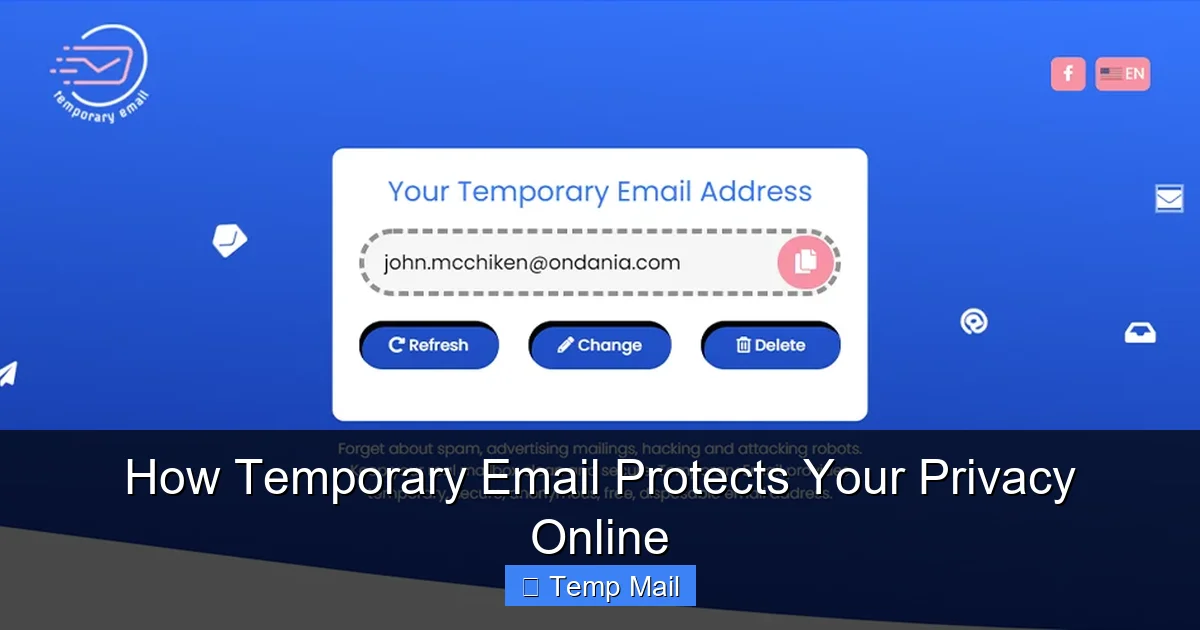
Your primary email address is a key to your digital identity, often targeted by spammers and data brokers. Temporary email services provide disposable, short-lived inboxes that act as a protective barrier. By using these for non-essential sign-ups and downloads, you isolate your main account from junk mail, potential data breaches, and unwanted tracking. It’s a simple, powerful tool for regaining control over your online privacy and keeping your permanent inbox clean and secure.
Key Takeaways
- Primary Email as a Target: Your main email address is linked to your identity and is a prime target for spam, phishing, and data aggregation, making it a privacy liability.
- Disposable Barrier: Temporary email creates a sacrificial layer, allowing you to interact with websites and services without revealing your permanent contact information.
- Spam and Tracking Prevention: By using a temp mail address for newsletters, forums, or downloads, you prevent those senders from ever reaching your primary inbox or building a profile on you.
- Breach Containment: If a service using your temporary email suffers a data breach, your primary accounts (social media, banking) remain unaffected and uncompromised.
- No Long-Term Commitment: These addresses self-destruct after a set time or number of emails, ensuring no long-term digital footprint is left from minor online interactions.
- Not for Critical Accounts: Never use temporary email for essential services like banking, primary cloud storage, or main social media accounts, as you will lose access permanently.
- Simple Privacy Hygiene: Incorporating disposable email into your routine is a low-effort, high-impact habit that significantly enhances your overall digital privacy posture.
📑 Table of Contents
- The Inbox Invasion: Why Your Primary Email is a Privacy Target
- What is Temporary Email and How Does it Work?
- Core Privacy Benefits: Shielding Your Identity
- Practical Use Cases: When to Use a Disposable Address
- Choosing the Right Temporary Email Service
- Limitations and Best Practices for Safe Usage
- Conclusion: A Simple Tool for a Complex Problem
The Inbox Invasion: Why Your Primary Email is a Privacy Target
Think about your primary email address. It’s probably the same one you’ve used for over a decade. It’s the key to your Amazon account, your Facebook profile, your bank, and countless other services. We treat it like a digital home address—permanent, reliable, and essential. But in the modern internet ecosystem, that very permanence makes it a massive privacy vulnerability.
Every time you sign up for a new app, download a whitepaper, or comment on a forum, you’re asked for an email. Often, buried in the terms of service is permission for that company to use your email for marketing, sell it to “partners,” or include you in data sets. Your inbox becomes a target for relentless spam campaigns. More insidiously, data brokers collect email addresses from breaches and public records, building detailed profiles that can be sold to advertisers, insurers, or even employers. Your primary email isn’t just an inbox; it’s a central node in your digital identity graph, and it’s under constant siege.
The Domino Effect of a Compromised Primary Email
If a hacker gains access to your primary email, the fallout can be catastrophic. They can use the “forgot password” feature on dozens of your other accounts—social media, cloud storage, even connected smart home devices. They can impersonate you to your contacts, harvesting personal information or spreading malware. The single point of failure is your email. Protecting this keystone account isn’t just about avoiding spam; it’s about securing your entire digital life from cascading breaches.
What is Temporary Email and How Does it Work?
Temporary email, also called disposable or throwaway email, is a service that provides you with a random, functional email address for a short period—typically a few hours to a few days. You don’t need to create an account or set a password. You simply visit the service’s website (like Temp-Mail, 10MinuteMail, or Guerrilla Mail), and a new inbox is generated for you instantly.
Visual guide about How Temporary Email Protects Your Privacy Online
Image source: anonymmail.net
You copy that random address (e.g., abc123@tempmail.demo) and use it wherever an email is required but you don’t want to use your real one. You can then check the inbox directly on the service’s website. Any emails sent to that address appear in that browser-based inbox. Once the time limit expires, or you manually delete it, the address and all its contents are permanently wiped from the server, never to be reused. It’s an ephemeral communication channel designed for one-time or short-term use.
The Technical Magic: No Setup, No Trace
The beauty of these services is their simplicity and anonymity. There’s no personal information tied to the temporary address. The server generates it randomly and associates it only with a session ID, often stored in your browser’s temporary memory. This means the provider itself doesn’t even know who you are. When the inbox expires, that association is severed. It’s a clean digital transaction: receive a message, read it, and let it vanish without a trace linked back to your identity.
Core Privacy Benefits: Shielding Your Identity
Using a temporary email isn’t about being paranoid; it’s about practicing smart privacy hygiene. The benefits are direct and powerful.
Visual guide about How Temporary Email Protects Your Privacy Online
Image source: gadgetsin.com
Benefit 1: A Moat Against Spam and Unwanted Marketing
This is the most obvious benefit. That free e-book you downloaded requires an email. That online forum you want to browse has a “members-only” wall. By using a temporary address, you create a sacrificial moat around your primary inbox. Any marketing newsletters, promotional blasts, or “special offers” sent to that disposable address will land in a temporary inbox that self-destructs. Your permanent inbox remains a sanctuary for emails from friends, family, and essential services only. You’ve successfully quarantined the spam at the source.
Benefit 2: Preventing Data Broker Profiling
Data brokers like Acxiom or Experian compile vast databases of personal information. They gather data from public records, purchase histories, and yes, email sign-ups across the web. Every time you use your primary email on a new site, you’re feeding their algorithm. A temporary email breaks this chain. The new service gets an email, but it’s a dead end. It can’t be linked back to your real identity, your other accounts, or your purchasing behavior. You stop contributing to the commercial surveillance economy at that specific point of entry.
Benefit 3: Mitigating the Risk of Data Breaches
News of data breaches is almost weekly. A company you signed up with years ago gets hacked, and your email, username, and possibly password are exposed on the dark web. If that email was your primary Gmail address, you’re now at significant risk. If it was a temporary address that expired six months after you used it, the breach is irrelevant to your core identity. The compromised credential is a hollow shell. Temporary email acts as a containment field for breach damage, ensuring minor online interactions don’t come back to haunt your critical accounts.
Benefit 4: Bypassing “Email Walls” Without Commitment
Many websites use an email gate to unlock content—a research paper, a software trial, a discount code. They want to capture your contact for future marketing. Using your primary email here is a direct trade. A temporary email lets you bypass that wall, get what you need, and walk away without any ongoing obligation or marketing funnel. You get the content; they get an inbox that will vanish before their first newsletter can be sent.
Practical Use Cases: When to Use a Disposable Address
Knowing the theory is good, but knowing when to actually use it is what makes the tool valuable. Here are the prime scenarios for deploying a temporary email address.
Scenario 1: One-Time Downloads and Content Gating
You found a fantastic template, a useful software trial, or an industry report. The site says “Enter your email to download.” This is the perfect use case. Use the temp mail, download the file, and forget about it. No risk of being added to a nurture email sequence for a product you don’t care about.
Scenario 2: Signing Up for Low-Trust or Unknown Services
You’re trying a new social platform, a gaming app, or a utility tool you’ve never heard of. You’re not sure about their privacy policy or their longevity. Use a disposable address. If the service turns out to be spammy or shuts down, your primary email is untouched. You can always provide your real email later if you decide to become a committed user.
Scenario 3: Creating Test Accounts for Developers or QA
If you’re a developer testing a registration flow, or a quality assurance engineer needing to verify email functionality, temporary email services are indispensable. You can script the creation of multiple test accounts without managing real inboxes or worrying about polluting your own email.
Scenario 4: Accessing Region-Locked or Forum Content
Some forums or comment sections require registration to view. If you just want to read a specific thread or comment without engaging long-term, a temporary email gets you past the registration wall instantly and anonymously.
Scenario 5: Avoiding “Reply-All” Email Chains
Ever been added to a massive, unnecessary “Reply All” email chain at work? If you use a temporary email for that one-off vendor contact or project sign-up, you can simply let that inbox expire and disappear from the chain entirely, avoiding the inbox clutter forever.
Choosing the Right Temporary Email Service
Not all disposable email services are created equal. While they share a core function, features and reliability differ. Here’s what to look for when choosing one.
Key Features to Consider
- Inbox Lifespan: Some offer 10-minute inboxes, others 24 hours, or up to a week. Choose based on your need. For a quick download, 10 minutes is fine. For a forum you might check a few times, look for a longer duration.
- Browser-Based vs. Custom Domain: Most are simple browser-based inboxes. Some offer custom domain options (e.g., yourname@mytempdomain.com) which can look more professional for certain uses.
- Attachment Support: Can the inbox receive attachments? This is crucial if you’re downloading a file. Many basic services block attachments for security.
- No Captcha/Paywall: The best services are straightforward. Avoid ones that bombard you with captchas or push you to a paid “premium” version to see your email.
- Clear Expiration Policy: The site should clearly state how long the inbox lasts and what happens after. Transparency is key.
Red Flags to Avoid
Steer clear of services that:
- Require you to create an account or provide any personal info to get a temp address.
- Show excessive, misleading ads that mimic download buttons.
- Have a history of storing or logging the emails that pass through (hard to verify, but check privacy policies).
- Are consistently down or slow, which will just frustrate you when you’re trying to get a verification email quickly.
For most users, sticking with well-known, established names in the space is the safest bet for reliability and basic privacy guarantees.
Limitations and Best Practices for Safe Usage
Temporary email is a powerful tool, but it’s not a magic shield for all online activity. Understanding its limits and using it correctly is essential.
Critical Limitations: What Temp Mail CAN’T Do
It is NOT for Important Accounts: Never, ever use a temporary email for your bank, primary cloud storage (Google Drive, iCloud), main social media accounts, or any service you need to access long-term. Once the inbox expires, account recovery is impossible. You will be locked out forever.
It CAN’T Guarantee 100% Anonymity: While the email itself is anonymous, your internet activity is not. If you are logged into your Google account while using a temp mail service, Google still knows your IP address and that you visited that site. For true anonymity, you’d need additional tools like a VPN or Tor.
Some Services Block Them: Many major platforms (Google, Apple, Microsoft, major banks) actively detect and block known temporary email domains from registering. They see these as high-risk for fraud and spam. You won’t be able to use a temp mail to create a Gmail account.
Essential Best Practices
- Use a Separate Browser or Incognito Window: To avoid any session leakage from your main logged-in accounts, open an incognito/private window to generate and use your temporary email.
- Never Use for Password Recovery: The whole point of a recovery email is to regain access. A temporary address defeats that purpose. Always use your primary, secure email for recovery options on important accounts.
- Check the Inbox Promptly: If you’re using it for a verification code, you often have a short time window (5-10 minutes). Have the temp mail inbox open in a tab before you request the email so you can copy the code immediately.
- Assume Nothing is Private: While the service provider may not log emails, the website you’re signing up with *will* see the temporary address you provided. They could, in theory, try to abuse it. The protection is from *your* primary address being exposed, not from the act of using the temp mail service itself being secret from the recipient.
- Clear Your Browser Data: After you’re done with a temporary email session, close the incognito window. If you used a regular window, clear your cookies and site data for that temp mail service to ensure no lingering session data remains.
Conclusion: A Simple Tool for a Complex Problem
In an online world engineered to harvest your email address and turn it into a marketing asset or a vulnerability, taking control is an act of digital self-defense. Temporary email isn’t about hiding from the internet; it’s about engaging with it on your own terms. It’s the difference between giving out your home phone number to every telemarketer versus using a separate, disposable line.
By adopting the habit of using a disposable address for the vast majority of online interactions that don’t genuinely require your permanent contact, you perform a powerful act of privacy triage. You protect your primary inbox from spam, insulate your critical accounts from breach fallout, and make yourself a less valuable target for data brokers. It’s a zero-cost, zero-setup tool that delivers immediate, tangible privacy benefits. Start today. Next time a website asks for your email for a simple download, pause. Open a new tab, generate a temporary address, and use that instead. It’s a small step that builds a formidable wall around your digital identity.
Frequently Asked Questions
Is using a temporary email address secure?
It is secure for its intended purpose—protecting your primary email from spam and data collection. However, the inboxes are not encrypted or password-protected on most free services, so anyone with the direct link could view the emails. Never use them for sensitive communications or account recovery.
Can I use temporary email for important accounts like banking or social media?
Absolutely not. You will permanently lose access to any account registered with a temporary email once the inbox expires. Always use your secure, permanent email address for any service you need to log into long-term or recover a password for.
How long do temporary emails last?
It varies by service. Common lifespans are 10 minutes, 1 hour, 1 day, or 1 week. The duration is always clearly stated by the provider. After that time, the inbox and all emails are permanently deleted from the server.
Will websites know I’m using a temporary email?
Yes. The service domain (e.g., @tempmail.demo) is publicly known. Many websites, especially financial or major tech platforms, block these domains from registering to prevent fraud. The website you’re signing up with will receive the disposable address as your contact.
What are the best uses for a temporary email?
Ideal uses include: downloading gated content (e-books, templates), signing up for one-time forums or comment sections, testing app registration flows, creating throwaway accounts for short-term projects, and avoiding marketing lists from non-essential services.
What happens if I need an email from a service I signed up with using a temporary address?
You won’t receive it. Once the temporary inbox expires, all emails sent to that address are bounced or deleted. This is why it’s critical to only use temp mail for interactions where you do not expect or need future communication from the sender.
Leave a Reply